Get started
Open a workbench, or build the tool.
The workbenches run in your browser and need nothing installed. The command-line tool runs the same Rust code on your own machine and writes every file a sewist, a copy shop or a cutting service asks for.
Nothing to install
Four workbenches.
Each opens with a working example. Open your own files when you are ready. They stay on your device.

Command line
A first pattern in four commands.
You need Git and Rust. The repository pins its own Rust version, and rustup fetches it on the first build.
01Get the source and build the tool.
git clone https://github.com/Dicklesworthstone/franken_textiles
cd franken_textiles
cargo build --release -p ftx-cli
# the program is now at target/release/ftx
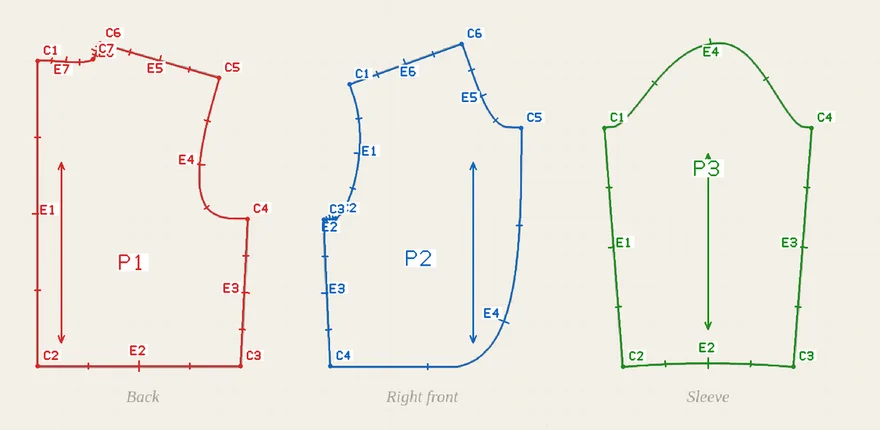
02Draft a bolero. The examples call the program ftx; use its full path, or add it to your path.
# reference measurements for a synthetic 92 cm wearer, from population data
ftx measure reference --stature-mm 920 --age-months 30 --out m.json

# draft the bolero to those measurements
ftx draft zouave_bolero --measurements m.json --out bolero
03Check it flat. Every seam is walked and each fit point is compared with the body.
ftx validate bolero/pattern.json --measurements m.json --fit bolero/fit_spec.json
STATUS: CONVERGED
04Write every file: tiled PDFs, copy-shop and projector sheets, SVG, DXF, HPGL, cutter and embroidery files.
ftx export all bolero/pattern.json --out bolero/files
PASS: 183/183 checks
Your own wearer
Start from a tape measure.
Begin a measurements file with a nickname, a height and an age, then add each measurement you take. Use a nickname, and keep the file out of anything you publish.
ftx measure init --label demo --stature 92cm --age-months 30 --out mine.json
ftx measure add mine.json --name chest --value 52cm
With only a height, the flat check answers STATUS: BLOCKED and lists each fit point it could not measure. It does not guess. Add the measurements it names and run it again.
In three dimensions
Sew it in simulation.
Draping fits the body model to the measurements, sews the pieces around it and lets the cloth settle. For the bolero this took about half a minute on one processor core.
# the body model is converted once on your machine; see tools/body-model in the repository
export FTX_ANNY_MODEL=/path/to/anny-0.6.1.ftxbody

ftx drape bolero/pattern.json --measurements m.json --fit bolero/fit_spec.json --out bolero/drape
fit: 0 gating, 0 advisory, settled
The output folder holds the report and fold_viewer.html, a single page that replays the fold in three dimensions. A result with no flags is a prediction. It is not a fit.
Reference
The commands.
Each prints plain text, or a stable JSON envelope with --json. Run ftx --help for every option.
ftx draft- Draft a bolero, trousers or a fez to a measurements file.
ftx validate- Walk every seam and check every fit point on the flat pattern.
ftx alter- Slash and spread, move a point, true a seam, ease a sleeve cap, or transfer a curve.
ftx trace- Trace a PNG, JPEG or WebP pattern sheet into pieces for review.
ftx body- Fit the body model to tape measurements and write the body on its own.
ftx drape- Sew a pattern around the fitted body and report the fit flags.
ftx export- Write the PDFs, SVG, DXF, HPGL, cutter and embroidery files, with their checks.
ftx round- Run the measurement gate, the flat check, the drape and the exports as one numbered round.
ftx measure- Start and extend a measurements file, or recover scale from a photograph.
ftx materials- Inspect sourced cloth records and bind them to a pattern.